Friday, 31 January 2020

Form with multiple steps php

1. If you want to create a multiple step form you can follow below step , i am using codeigniter as my framwork php , index function is a single function which will handle your request and process your form , $form_process_id,$form_id,$step_id_u,$is_previous_action is the main variable other variable are my custom variable which i am passing , you can assign your variable as per your requirement.

2. fpi short means form process id, multiple if else in index function is for like when you in step1 include only step1 data , if you in step 2 include only step2 data by fetching records from mysql.

3. if you see the screenshot there is a table which contain post_values,post_values_front fields in mysql , post_values fields store form data as serialize at user end and post_values_front store the html which you can be save from your admin panel.

4. $data['main'] in index function just get the in which step you are and fetch accordingly. you have to create a directory stepforms , where step1.php , step2.php.... etc file will be created as per multi form you want to create , Please see below what html they will containstep1.php ...etc. i have included my custom variable also for query to database you can remove those. I commented the $save_step_data in else statement because for front end user update query always fire not new record will be added because from your admin panel step data , html already saved, for admin panel you have to enable those line , because admin side iif fpi found then update if not then insert/save will goes accordinlgy. you can also include js/jquery in step1.php or step2.php etc. you can use below function for any kind of multiple user registration or where you need any kind of multiple form submission.

class MultiStep extends MY_Controller {
    public function index() {
        $search_gstin_id = (int) isset($_GET['sid']) ? trim($this->input->get('sid', TRUE)) 
: trim($this->input->post('sid', TRUE));
      $financial_year = isset($_GET['fy']) ? $this->input->get('fy', TRUE) : $this->input->post('fy', TRUE);
      $form_process_id = (int) $this->input->get('fpi');
      $is_previous_action = $this->input->get('p');
      $form_id = $this->uri->segment(3, 0);
      $step_id_u = $this->uri->segment(4, 1);
      $step_id_p = isset($_POST['step_id']) ? (int) $step_id_u : $step_id_u;
      $this->load->model('AuditCustomForms');
      $total_steps = $this->AuditCustomForms->get_total_form($form_id);
      $form_name_info = $this->AuditCustomForms->get_form_name($form_id);
      if ($step_id_p != '') {
          if ($is_previous_action != '') {
              $field_id = (int) $step_id_p;
          } else {
              $field_id = (int) $step_id_p;
          }
      } else {
          $field_id = $step_id_u;
      }
      $form_info = $this->AuditCustomForms->get_step_from($form_id, $field_id);
      $form_data = $this->AuditCustomForms->get_from_data($form_process_id, $field_id);
      $save_id = '';
      if (!empty($_POST) && is_array($_POST)) {
          $sdata = $this->input->post();
          unset($sdata['step_id']);
          unset($sdata['form_id']);
          if ($this->input->get('isf') == 'yes') {
              if (!empty($form_data)) {
                $save_step_data = array('post_values_front' => serialize($sdata), 'status' => 1,
 'search_gstin_id' => $search_gstin_id, 'gst_financial_year' => $_POST['fy']);
                $save_id = $this->AuditCustomForms->do_update_records('audit_post_values',
 $save_step_data, array('form_process_id' => $form_process_id, 'field_id' => $step_id_u));
              } else {
               //$save_step_data = array('status' => 1, 'form_process_id' => $form_process_id
, 'user_id' => $this->user_id, 'form_id' => $form_id, 'field_id' => $step_id_u,
 'post_values_front' => serialize($sdata), 
'created_date' => $this->today, 'search_gstin_id' => $_POST['sid'], 'gst_financial_year' => $_POST['fy']);
                //$save_id = $this->AuditCustomForms->do_save_records('audit_post_values', $save_step_data);
              }
            $_SESSION['markfront'] = alertmessage($message_type = 'alert-success', 
$message = 'TaxAudit have been saved successfully.');
              $this->session->mark_as_flash('markfront');
              redirect(base_url() . '/dashboard/');
              exit;
           } else {
           if (!empty($form_data)) {
              $save_step_data = array('status' => 1, 'post_values_front' => serialize($sdata),
 'search_gstin_id' => $search_gstin_id, 'gst_financial_year' => $_POST['fy']);
             $save_id = $this->AuditCustomForms->do_update_records('audit_post_values'
, $save_step_data, array('form_process_id' => $form_process_id, 'field_id' => $step_id_u - 1));
           } else {
            //$save_step_data = array('status' => 1, 
'form_process_id' => $form_process_id, 'user_id' => $this->user_id, 'form_id' => $form_id,
'field_id' => $step_id_u, 'post_values_front' => serialize($sdata),
'created_date' => $this->today, 'search_gstin_id' => $_POST['sid'], 'gst_financial_year' => $_POST['fy']);
            //$save_id = $this->AuditCustomForms->do_save_records('audit_post_values', $save_step_data);
           }
          }
        }
        if ($step_id_u == 2) {
        } else if ($step_id_u == 3) {
        } else if ($step_id_u == 4) {
        } else if ($step_id_u == 5) {
        } else if ($step_id_u == 6) {
        } else if ($step_id_u == 7) {
        } else if ($step_id_u == 8) {
        } else if ($step_id_u == 9) {
        } else if ($step_id_u == 10) {
        } else if ($step_id_u == 11) {
        } else if ($step_id_u == 12) {
        } else {
        }
        $data['search_gstin_id'] = $search_gstin_id;
        $data['financial_year'] = $financial_year;
        $data['form_process_id'] = $form_process_id;
        $data['form_info'] = $form_info;
        $data['form_data'] = $form_data;
        $data['form_id'] = $form_id;
        $data['next_step'] = count($form_info) > 0 ? $form_info[0]->field_id : '';
        $data['actual_step_id_p'] = $step_id_p;
        $data['post_id'] = $save_id;
        $data['form_name_info'] = $form_name_info;
        $data['header'] = 'dashboard/header';
        $data['main'] = 'stepforms/' . $form_id . '/' . $form_info[0]->step;
        $data['footer'] = 'front/footer';
        $this->load->vars($data);
        $this->load->view($this->user_dashboard);
    }
}

5. Below is the model which contain function for saving and updating form data ,generateFormToken function will generate a unique fpi for your form. model is just fetching records from mysql database.

class AuditCustomForms extends CI_Model {
    function __construct() {
        parent::__construct();
        $this->load->database();
    }
    function generateFormToken() {
        $query = $this->db->query('SELECT LPAD(FLOOR(RAND()*99999), 5, 0) AS random_num FROM 
        audit_post_values WHERE "random_num" NOT IN (SELECT post_id FROM audit_post_values) LIMIT 1');
        $row = $query->row();
        if (isset($row)) {
            return $row->random_num;
        } else {
            $query = $this->db->query('SELECT LPAD(FLOOR(RAND()*99999), 5, 0) AS random_num');
            $row = $query->row();
            return $row->random_num;
        }
    }
    function get_step_from($form_id, $field_id) {
        $this->db->select('ff.*');
        $this->db->from('audit_form_fields ff');
        $this->db->where('ff.form_id', $form_id);
        $this->db->where('ff.field_id', $field_id);
        $query = $this->db->get();
        return $query->result();
    }
    function do_update_records($table, $data, $where) {
        $this->db->where($where);
        if ($this->db->update($table, $data)) {
            $query_id = $this->db->select('post_id')->where($where)->get($table);
            return $query_id;
        } else {
            return NULL;
        }
    }
    function do_save_records($table, $data) {
        if ($this->db->insert($table, $data)) {
            return $this->db->insert_id();
        } else {
            return NULL;
        }
    }
    function get_from_data($form_process_id, $field_id) {
        $this->db->select('*');
        $this->db->from('audit_post_values pv');
        $this->db->where('pv.form_process_id', $form_process_id);
        $this->db->where('pv.field_id', $field_id);
        $query = $this->db->get();
        if ($query->num_rows() > 0) {
            return $query->result();
        } else {
            return NULL;
        }
    }
}

6. Below is the first step form , either you can include html directly to below view file or if you want to fetch html from database for example you have a admin panel where you manage content , you can also make or use same function for your admin panel which store only html in post_values fields as serialised and them you can use it like below or replace "//your html element , form will go here step 1" by below line , so what ever html you saved from your admin panel it will display that html for step1 , step2.....etc.

$str_template=!empty($form_html['auditforms']) ? html_entity_decode($form_html['auditforms']) : '';
<?php
if (!empty($form_data)) {
    $form_html = unserialize($form_data[0]->post_values);
    $post_values_front = unserialize($form_data[0]->post_values_front);
}
?><section class="section novi-background sec_nw">
    <div class="container">
        <div class="section-sm-41 row justify-content-sm-center align-items-sm-center">
            <div class="card section-34">
                <?php echo form_open(base_url() . 'MultiStep/index/
' . $form_id . '/2/?fpi=' . $form_process_id . '&sid=' . $search_gstin_id . '&fy=' . $financial_year . ''
, array('class' => "", 'autocomplete' => "on", 'id' => 'form1', 'name' => 'form1', 'method' => 'post')); ?>
                <input type="hidden" name="form_id" id="form_id" 
value="<?php echo!empty($form_info) ? $form_info[0]->form_id : ''; ?>"> 
                <input type="hidden" name="step_id" id="step_id" value="<?php echo $next_step; ?>"> 
                <input type="hidden" name="sid" id="sid" value="<?php echo $search_gstin_id; ?>"> 
                <input type="hidden" name="fy" id="fy" value="<?php echo $financial_year; ?>"> 
                //your html element , form will go here step 1
                <input type="submit" class="btn bg-orange btn-flat pull-right" value="Next"/>
                <?php echo form_close(); ?> 
            </div>
        </div>
    </div>
</section>

7. Below is the step2 so previous and next value assign accordingly. you can set previous and next value or step_id, only your html part will be dynamic from mysql.

<section>
    <div class="container profile-edit">
        <div class="section-sm-41 row justify-content-sm-center align-items-sm-center">
            <div class="card section-34">
                <?php echo form_open(base_url() . 'MultiStep/index/
' . $form_id . '/3?fpi=' . $form_process_id . '&sid=' . $search_gstin_id . '&fy=' . $financial_year . ''
, array('class' => "", 'autocomplete' => "on", 
'enctype' => "multipart/form-data", 'id' => 'step1', 'name' => 'step1', 'method' => 'post')); ?>
                <input type="hidden" name="form_id" id="form_id" 
value="<?php echo!empty($form_info) ? $form_info[0]->form_id : ''; ?>"> 
                <input type="hidden" name="step_id" id="step_id" value="<?php echo $next_step; ?>">
                <input type="hidden" name="sid" id="sid" value="<?php echo $search_gstin_id; ?>"> 
                <input type="hidden" name="fy" id="fy" value="<?php echo $financial_year; ?>"> 
                //your html element , form will go here step 2
                <div class="col-offset-10">
                    <a href="<?php echo base_url() . 'MultiStep/index/
' . $form_info[0]->form_id . '/1/?sid=' . $search_gstin_id . 
'&fpi=' . $form_process_id . '&p=' . $actual_step_id_p . '&audit_form_id=' . $form_id . 
'&fy=' . $financial_year; ?>" class="btn bg-orange btn-flat pull-left">Prev</a>
                    <input type="submit" class="btn bg-orange btn-flat pull-right" value="Next"/>
                </div>
                <?php echo form_close(); ?> 
            </div>
        </div>
    </div>
</section>

8.In my project there are 24 steps so that is my last step , may in your case there is less step then mine , if you are making your last step so &isf=yes should be added in rest of step isf will not add to recognise last we are in last request.

<section class="section novi-background sec_tab">
    <div class="container profile-edit">
        <div class="section-sm-41 row justify-content-sm-center align-items-sm-center">
            <div class="card section-34 ">
                <?php echo form_open(base_url() . 'TaxAudit/index/
' . $form_id . '/24/?fpi=' . $form_process_id . '&isf=yes', array('class' => "", 
'autocomplete' => "on", 'id' => 'form1', 'name' => 'form1', 'method' => 'post')); ?>
                <input type="hidden" name="form_id" id="form_id" 
value="<?php echo!empty($form_info) ? $form_info[0]->form_id : ''; ?>"> 
         <input type="hidden" name="step_id" id="step_id" value="<?php echo $next_step; ?>"> 
         <input type="hidden" name="sid" id="sid" value="<?php echo $search_gstin_id; ?>"> 
         <input type="hidden" name="fy" id="fy" value="<?php echo $financial_year; ?>"> 
          //your html element , form will go here step finished
        <div class="col-offset-10">
        <a href="<?php echo base_url() . 'TaxAudit/index/
' . $form_info[0]->form_id . '/23/?sid=' . $search_gstin_id . '&fpi=
' . $form_process_id . '&p=' . $actual_step_id_p.'&
audit_form_id=' . $form_id . '&fy=' . $financial_year; ?>" class="btn bg-orange btn-flat pull-left">Prev</a>
           <input type="submit" class="btn bg-orange btn-flat pull-right" value="Finished"/>
           </div>
           <?php echo form_close(); ?> 
     </div>
     </div>
    </div>
</section>

9. The screenshot will show you the table structure to manange multi step form.


Tuesday, 28 January 2020

User roles permission menu treeview

1. If you want to build a user role permission and dynamic side bar menu in your web application using Codeigniter and Mysql , In this senario all menu and submenu will show like a tree using jstree.Below is the js you will required

#link https://cdnjs.cloudflare.com/ajax/libs/jstree/3.2.1/themes/default/style.min.css
#https://cdnjs.cloudflare.com/ajax/libs/jstree/3.2.1/jstree.min.js

2. Below is the part of html you required to display all menu items (Menu Permission) , you can just copy and paste it in any html or where you want to show that menus for admin panel or user , you can customise accordingly. AdminMenu is the model , you can place this line in any of your view file it will return html of ul, li and if you want not directly placing in view you can call controller function then parse data in view file.

echo this->AdminMenu->get_menu($role_id);

3. Below script goes in your view file or javascript file. showalert_mpop is a javascript function , you can see my other post to check this function it simply alert , display message with setTimeOut.

<script>
    $(function () {
        var tree = $("#treeview2");
        tree.jstree({
            plugins: ["checkbox", 'json_data'],
            core: {
                "themes": {
                    "icons": false,
                    "variant": "large",
                    "multiple": false,
                    "check_callback": true,
                }
            },
            "checkbox": {
                "keep_selected_style": false,
                "two_state": true,
            }
        });
        tree.jstree(true).open_all();
        $('li[data-checkstate="checked"]').each(function () {
            tree.jstree('check_node', $(this));
        });
        tree.jstree(true).close_all();
        $(function () {
            $('#treeview2').on('select_node.jstree Event', function (e, data) {
                var checked_menu_id = '';
                var parent_menu_id = '';
                if (data.node.children.length > 0) {
                    $.each(data.node.children, function (key, value) {
                        checked_menu_id += $("#" + value).attr('name') + ',';
                    }).join(',');
                    parent_menu_id = $("#" + data.node.id).attr('name');
                } else {
                    checked_menu_id = $("#" + data.node.id).attr('name');
                    parent_menu_id = $("#" + data.node.parent).attr('name');
                }
                var rid_c = "";
                $.ajax({
                url: base_url+'Settings/do_save_menu_per',
                type: 'POST',
                dataType: 'json',
                data: {mid: checked_menu_id, rid: rid_c, status: 'checked', 'parent': parent_menu_id},
                beforeSend: function () {
                   $(".faster_ajax_loader").css('display', 'block');
                },
                complete: function () {
                   $(".faster_ajax_loader").css('display', 'none');
                },
                success: function (response) {
                     showalert_mpop(response.msg, 'gobal_msg');
                 }
                });
            });
        });
        $('.minimal').on('click', function(event){
            var is_chk_unch='';
            if(this.checked) {
                 is_chk_unch='y';
            }else{
               is_chk_unch='n';
            }            
            $.ajax({
             url: base_url + 'Settings/do_save_module_per',
             type: 'POST',
             dataType: 'json',
             data: {is_chk: is_chk_unch, id: $(this).prop('id')},
             beforeSend: function () {
                 $(".faster_ajax_loader").css('display', 'block');
             },
             complete: function () {
                 $(".faster_ajax_loader").css('display', 'none');
             },
             success: function (response) {
                    showalert_mpop(response.msg, 'gobal_msg');
             }
            });
        });
   });
</script>

4. Table schema you can view and download from below link and admin module you can also view see link

#https://github.com/boy108zon/User-Roles-Permission-Menu-TreeView/blob/master/table%20structure.txt
https://github.com/boy108zon/User-Roles-Permission-Menu-TreeView/blob/master/AdminMenu.php

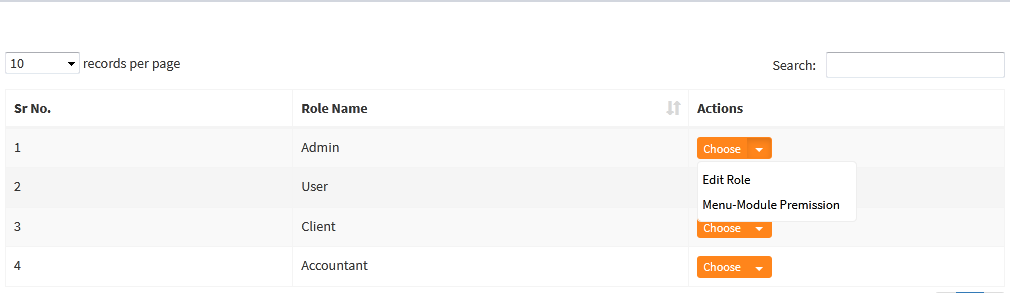
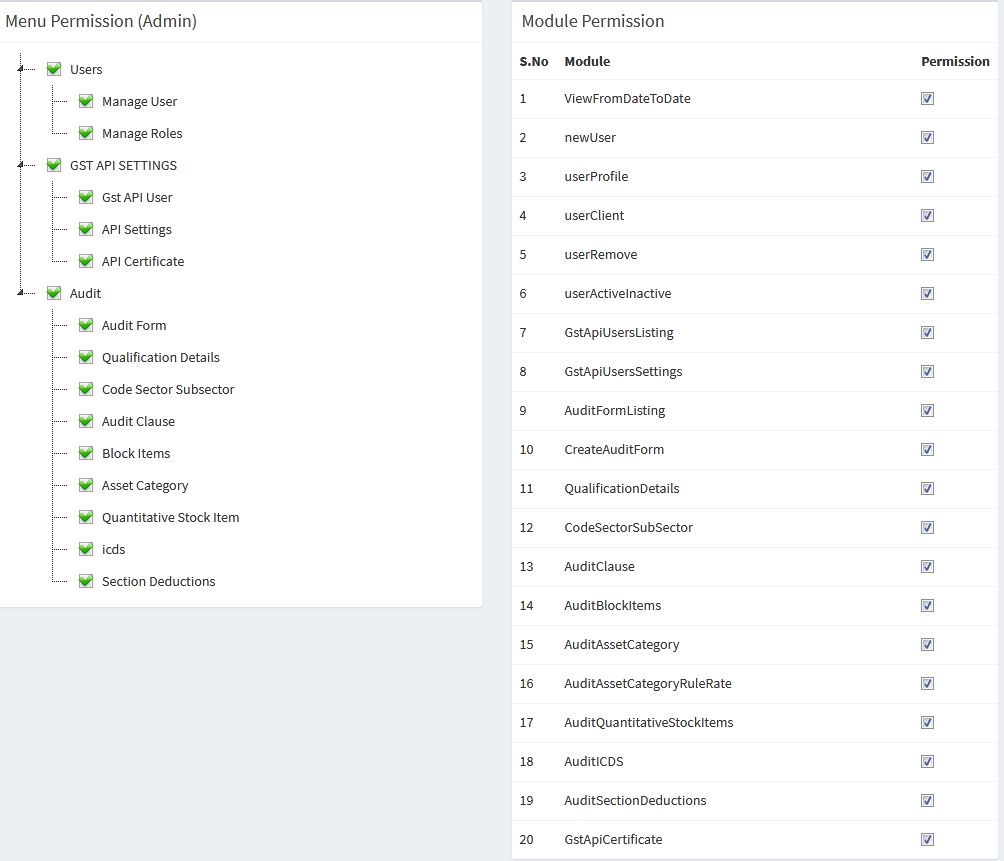
5. The screenshot will show you the final output like side bar menu , module and permission with checkbox , you can easily assign permission based on your roles.


Monday, 20 January 2020

Encrypt decrypt aes ecb openssl

This class provide a way of Encryption & decrypt GST PHP code helps illustrate how to encryption & decript, to protect sensitive data. Using openssl_encrypt and openssl_decrypt cryptographic functions.

you don't need to intantiate the class object because its funciton are static. you can directly access the methods.certificate_file_path is your cert file path it can be sandbox or production cert files ,you can either generate it or get it from providers.

You can also use below class to generate token for any web application , $filepath will be the path of security certificate (.cer) on your local machine or your server path where you kept the .cer file. If you don't have a .cer file you can just google for it to "How To Generate .Cer File". AES known as Advanced Encryption Standard is a symmetric-key encryption algorithm.

class GSTAPIENC {
    static function test(){
        return 1;
    }
    static function generateappKey ($appkey,$filepath){
        openssl_public_encrypt($appkey, $encrypted, file_get_contents($filepath));
        return base64_encode($encrypted);   
    }
    static function encryptOTP($otp_code,$appkey) {
       return base64_encode(openssl_encrypt($otp_code, "AES-256-ECB", $appkey, OPENSSL_RAW_DATA));
    }
    static function encryptData($data, $key) {
        return base64_encode(openssl_encrypt($data, "AES-256-ECB", $key, OPENSSL_RAW_DATA));
    }
    static function mac256($ent, $key) {
        $res = hash_hmac('sha256', $ent, $key, true); 
        return $res;
    }
    static function decryptData($data, $key) {
        return openssl_decrypt(base64_decode($data), "AES-256-ECB", $key, OPENSSL_RAW_DATA);
    }
    static function decodeJsonResponse($out, $rek, $ek) {
        $apiEK = GSTAPIENC::decryptData($rek, $ek);
        return base64_decode(GSTAPIENC::decryptData($out, $apiEK));
    }
    static function keygen($length = 10) {
        $key = '';
        list($usec, $sec) = explode(' ', microtime());
        mt_srand((float) $sec + ((float) $usec * 100000));
        $inputs = array_merge(range('z', 'a'), range(0, 9), range('A', 'Z'));
        for ($i = 0; $i < $length; $i++) {
            $key .= $inputs{mt_rand(0, 61)};
        }
        return base64_encode($key);
    } 
}

You can use it like below to generate API KEY

$certificate_file_path = "PATH OF YOUR SANDBOX OR PRODUCTION cert file.";
$generated_key = GSTAPIENC::keygen(32);
$appKey = GSTAPIENC::generateappKey(base64_decode($generated_key), $certificate_file_path);

You can also view download source

https://github.com/boy108zon/Encryption-Decription-GST

Wednesday, 8 January 2020

Popover jquery content with ajax php

Let say if you have a user listing Or any kind of dynamic listing which is displaying information from database like mysql etc.. , so some time we want information of each users or product to display over a jQuery Popover with tab based. When popover will open it shows tab based information so that more information can be displayed over it.Below is the html link where user can click to get information.

Basically i had a loop of listing where i have to show up jquery popover with tab based so, when user click on button , viewSearchPayer function call and has one argument which can be userid or any thing. You can also take any unique ids or your data array element which is comming unique in Array. popoverId is important so that we can easily destroy or close the popover.

Response from your server side script like PHP etc will be html of tab ul li with user information or as per your requirements you can set accordingly.

<a class='btn btn-xs btn-warning' onclick='viewSearchPayer('EENPS9');'>gtInfo</a>

Below is the javascript function which is called when user click on button which have onclick event.

function viewSearchPayer(id) {
var popoverId = 'clientinfo_' + id;
var elem='Information 
<button type="button" onclick="closePop('+id+')" id="close" class="close">×<button>';
    $.ajax({
        type: 'POST',
        url: 'your_url_here',
        data: {"method": "viewSearchPayer", "id": id},
        dataType: 'json',
        async: true,
        success: function (response) {
            var Result;
            if (response.RESULT == 'SUCCESS') {
                Result = response.data;
            } else {
                Result = response.data;
            }
            $("."+popoverId).popover({
                container: 'body',
                placement: 'top',
                html: true,
                title: elem,
                content: Result
            }).popover('show');
        }
    });
}
Below is the javascript function which is called when user click on close button over popover so that we can close it. popoverId should be unique or you can adjust it according to your need.
function closePop(popoverId) {
     var closepopoverId = 'clientinfo_' + popoverId;
     $("."+closepopoverId).popover('hide');
  }

Below is the simple tab based html markup which you can revert back from your server side language like PHP , In this tab based you can also get dynamic data and display accordingly from database to these tabs.

 <ul class="nav nav-tabs">
<li class="active"><a href="#tab1" data-toggle="tab">Info</a></li>
<li class="tab"><a href="#tab2" data-toggle="tab">Track</a></li>
</ul><div class="tab-content">
<div class="tab-pane active" id="tab1"> 
tab1</div>
<div class="tab-pane" id="tab2">
tab2</div></div>

Thursday, 18 April 2019

Output mysql query result in csv

1. Exporting data from mysql and then providing for downloading it using Codeigniter. it will also rename table columns fields as you required. it will create a csv file then download using force_download function. get_report function will be in a model and download is a controller function.

2. $table variable parameter denotes the name of table from which you want to get data , $header is the header information as column in csv file , You can add another case in switch condition to fetch another table record and add assign $header value as of table column. By doing this you can limit the only fields that needs to show in csv file when it will download.

3. UPLOAD_PATH_DOCUMENT_VIEW , you can define it in constant.php file in codeigniter mvc framwork like define('UPLOAD_PATH_DOCUMENT_VIEW ',FCPATH.'');

public function get_report($table,$search_gstin_id,$month,$year,$user_id,$form_id){
$this->load->dbutil();
$this->load->helper('file');
$month_in = '('.month_in_clause($month).')';
switch ($table) {
    case 'b2b':
        $header = array('gstin_uin_of_recipient', 'month', 'year',
 'receiver_name', 'invoice_number', 'invoice_date', 'invoice_value',
 'place_of_supply', 'reverse_charge', 'applicable_per_of_tax_rate', 'invoice_type',
 'e_commerce_gstin', 'rate', 'taxable_value', 'cess_amount',
 'hsn_no', 'hsn_uqc', 'hsn_total_quantity', 'created');
        break;
    case 'b2cs':
        $header = array('month', 'year', 'type', 
'place_of_supply', 'applicable_per_of_tax_rate',
 'rate', 'taxable_value', 'cess_amount', 'e_commerce_gstin', 'created');
        break;
    default:
        break;
 }
 $myheaer = array();
 foreach ($header as $key => $value) {
    $myheaer[] = $value." AS '".str_replace('_', ' ', ucfirst($value))."'";
 }
 $table_columns = implode(",", $myheaer);
 $delimiter = ",";
 $newline = "\r\n";
 $enclosure = '"';
 $q = "Select " . $table_columns . "  from " . $table . " 
 where user_id=" . $user_id . " and form_id=" . $form_id . " 
 and search_gstin_id=" . $search_gstin_id . " and month in " . $month_in . "";
 $query = $this->db->query($q);
 if ($query->num_rows() > 0) {
    $csvContent = $this->dbutil->csv_from_result($query, $delimiter, $newline, $enclosure);
    if (!write_file(UPLOAD_PATH_DOCUMENT_VIEW . '/document_view.csv', $csvContent)) {
        return "UNABLE-TO-WRITE";
    } else {
        return "WRITED";
    }
  } else {
    return NULL;
  }
}

4. reports function is the model function which you can make and just simple revert back the array from mysql database.

public function download() {
 $this->load->helper('download');
 $search_gstin_id = (int) $this->uri->segment(3, 0);
 $month = $this->uri->segment(4, 0);
 $year = (int) $this->uri->segment(5, 0);
 $report_type = $this->uri->segment(6, 0);
 $form_id = (int) $this->uri->segment(7, 0);
 $this->load->model('Gstin');
 $result=$this->Gstin->reports($report_type,$search_gstin_id,$month,$year,$user_id,$form_id);
 if(!empty($result)){
  if($result =='UNABLE-TO-WRITE'){
   $_SESSION['markfront']=alertmessage($message_type='alert-success',$message='UnableWrite');
   $this->session->mark_as_flash('markfront');
   redirect(base_url().'');
   exit;
 }else{
 $filename = $report_type . '_' . date('Ymd') . '.csv';
 $inputFileName=UPLOAD_PATH_GSTR1_DOCUMENT_VIEW.'/upload_document_view.csv';
 force_download($filename, file_get_contents($inputFileName));
 exit;
    }
  }  
 }

5. Below function is a helper function which builds just replace dash with comma and make a in clause like '01','03'...etc

function month_in_clause($months) {
    $month = "'" . str_replace("-", "','", $months) . "'";
    return $month;
}

Friday, 7 July 2017

php mysql mysqli quries class

Below class file handle mysql and mysqli connection & quries. you can select all records as well as can place where clause also saving records , removing records , executing direct query with Mysql OR MySqli as defined in config.php file.
1. Your config.php file will be as below , you can change it and placed values accordingly as your mysql database. resource_type Mysql OR MySqli
$dbconfig['db_server'] = 'localhost';
$dbconfig['db_port'] = ':3306';
$dbconfig['db_username'] = 'root';
$dbconfig['db_password'] = '';
$dbconfig['db_name'] = 'test';
$resource_type='MySqli';
2. Below is MysqlDatabaseMysqli.php class which has functions , you can execute Queries with MySql or MySqli.
require_once 'config.php';
Class MysqlDatabaseMysqli {
    protected $connection = NULL;
    protected $connection_string = NULL;
    protected $associate_type = NULL;
    function __construct() {
        global $resource_type;
        $this->resource_type_string = strtolower($resource_type);
        switch ($resource_type) {
            case 'MySql':
                $this->associate_type = MYSQL_ASSOC;
                $this->msl_connect();
                break;
            case 'MySqli':
                $this->associate_type = MYSQLI_ASSOC;
                $this->msli_connect();
                break;
            default:
                echo "No resource type define";
                exit;
                break;
        }
    }
    /*
     *  msl->mysql
     */
    function msl_connect() {
        global $dbconfig;
        try {
            if ($link_identifier = @mysql_connect($dbconfig['db_server'], 
                $dbconfig['db_username'], $dbconfig['db_password'])) {
                $select_db = @mysql_select_db($dbconfig['db_name'], $link_identifier);
                if (!$select_db) {
                    throw new Exception(mysql_errno() . ' ' . mysql_error());
                }
                $this->connection = $link_identifier;
            } else {
                throw new Exception(mysql_errno() . ' ' . mysql_error());
            }
        } catch (Exception $e) {
            echo $e->getMessage();
        }
    }
    /*
     *  msli->mysqli
     */
    function msli_connect() {
        global $dbconfig;
        try {
            if ($link_identifier = @mysqli_connect($dbconfig['db_server']
                , $dbconfig['db_username'], $dbconfig['db_password'])) {
                $select_db = @mysqli_select_db($link_identifier, $dbconfig['db_name']);
                if (!$select_db) {
                    throw new Exception(mysqli_connect_errno() . ' Unable to select db');
                }
                $this->connection = $link_identifier;
            } else {
                throw new Exception(mysqli_connect_errno() . ' Unable to connect');
            }
        } catch (Exception $e) {
            echo $e->getMessage();
        }
    }
    /*
     *  Created By: Boy108zon
     *  @table_name: string
     *  @where: Array
     */
    function get_records($table_name, $where=NULL) {
        $connect = $this->resource_type_string . '_query';
        $num_rows = $this->resource_type_string . '_num_rows';
        $connect_close = $this->resource_type_string . '_close';
        /* if where included */
        $qwhere = '';
        if (is_array($where)) {
            $counter = 0;
            foreach ($where as $key => $value) {
                if ($counter > 0) {
                    $qwhere .= ' AND ';
                }
                $qwhere .= "$key = '$value'";
                $counter++;
            }
            $qwhere = 'WHERE ' . $qwhere;
        }
        $query = "SELECT * from $table_name $qwhere";
        if ($this->resource_type_string == 'mysqli') {
            $result_resource = $connect($this->connection, $query);
        } else {
            $result_resource = $connect($query, $this->connection);
        }
        $noOfrows = $num_rows($result_resource);
        if ($noOfrows > 0) {
            return $this->db_to_array($result_resource);
        } else {
            return NULL;
        }
    }
    /*
     *  Created By: Boy108zon
     *  @table_name: string
     *  @where: Array
     */
    function remove_records($table_name, $where=NULL) {
        $connect = $this->resource_type_string . '_query';
        $affected_rows = $this->resource_type_string . '_affected_rows';
        $connect_close = $this->resource_type_string . '_close';
        /* if where included */
        $qwhere = '';
        if (is_array($where)) {
            $counter = 0;
            foreach ($where as $key => $value) {
                if ($counter > 0) {
                    $qwhere .= ' AND ';
                }
                $qwhere .= "$key = '$value'";
                $counter++;
            }
            $qwhere = 'WHERE ' . $qwhere;
        }
        $query = "DELETE from $table_name $qwhere";
        if ($this->resource_type_string == 'mysqli') {
            $result_resource = $connect($this->connection, $query);
        } else {
            $result_resource = $connect($query, $this->connection);
        }
        $idds = $affected_rows($this->connection);
        //close connection
        @$connect_close($this->connection);
        if ($idds > 0) {
            return $idds;
        } else {
            return NULL;
        }
    }
    /*
     *  Created By: Boy108zon
     *  @result->mysql OR mysqli
     */
    function db_to_array($result) {
        $connection_string = $this->resource_type_string . '_fetch_array';
        $rows = array();
        while ($row = $connection_string($result, $this->associate_type)) {
            $rows[] = $row;
        }
        //close connection
        @$connect_close($this->connection);
        return $rows;
    }
    /*
     *  Created By: Boy108zon
     *  @table_name: String
     *  @post_array:Array
     *  @where:Array
     *  @mode:'save' OR edit
     *  Based on mode return type affected rows and latest insert id
     */
    function save_records($table_name, $post_array, $where=NULL, $mode='save') {
        $connect = $this->resource_type_string . '_query';
        $insert_id = $this->resource_type_string . '_insert_id';
        $affected_rows = $this->resource_type_string . '_affected_rows';
        $connect_close = $this->resource_type_string . '_close';
        $count = 0;
        $fields = '';
        foreach ($post_array as $col => $val) {
            if ($count > 0) {
                $fields .= ', ';
            }
            $fields .= "$col = '$val'";
            $count++;
        }
        $qwhere = '';
        if (is_array($where)) {
            $counter = 0;
            foreach ($where as $key => $value) {
                if ($counter > 0) {
                    $qwhere .= ' AND ';
                }
                $qwhere .= "$key = '$value'";
                $counter++;
            }
            $qwhere = 'WHERE ' . $qwhere;
        }
        if ($mode == 'edit') {
            $query = "UPDATE " . $table_name . " SET $fields $qwhere;";
        } else {
            $query = "INSERT INTO " . $table_name . " SET $fields;";
        }
        if ($this->resource_type_string == 'mysqli') {
            $result_resource = $connect($this->connection, $query);
        } else {
            $result_resource = $connect($query, $this->connection);
        }
        if ($mode == 'edit') {
            $idds = $affected_rows($this->connection);
        } else {
            $idds = $insert_id($this->connection);
        }
        //close connection
        @$connect_close($this->connection); 
        if ($idds > 0) {
            return $idds;
        } else {
            return NULL;
        }
    }
    /*
     *  Created By: Boy108zon
     *  @query: full query including inner , where
     *  if required we can also use it.
     */
    function get_direct_query_records($query) {
        $connect = $this->resource_type_string . '_query';
        $num_rows = $this->resource_type_string . '_num_rows';
        $connect_close = $this->resource_type_string . '_close';
        if ($this->resource_type_string == 'mysqli') {
            $result_resource = $connect($this->connection, $query);
        } else {
            $result_resource = $connect($query, $this->connection);
        }
        $noOfrows = $num_rows($result_resource);
        //close connection
        @$connect_close($this->connection); 
        if ($noOfrows > 0) {
            return $this->db_to_array($result_resource);
        } else {
            return NULL;
        }
    }
}
3. You can use it like below
require_once 'MysqlDatabaseMysqli.php'; 
$dbfun=new MysqlDatabaseMysqli(); 

$result=$dbfun->get_records('employee',array('name'=>'amit'));
//For Retrive records from employee table. 
$result=$dbfun->get_records('your_table_name');
//edit 
$result=$dbfun->save_records('your_table_name',$post_array,$where,$mode='Edit');
//save 
$result=$dbfun->save_records('your_table_name',$post_array);
//remove 
 $result=$dbfun->remove_records('your_table_name',array('id'=>6));
// direct query 
$result=$dbfun->get_direct_query_records($query='select * from employee');
4. You can download class from below
https://github.com/boy108zon/SingelMysqlMysqli

Monday, 13 March 2017

Custom save function vTiger module

 
Generally vTiger provides save_module , save function for saving records.But let say you have a deposit module and you want custom function for saving records in vTiger (6.4). basically deposit module has relation with Account module. so in vTiger vtiger_crmentity table maintain every records or operation done and vtiger_crmentity_seq store max id or sequence number , so below are the functions which process save functionality by using custom queries for two modules.
 
function save_module_custom($module, $post_array) {
        return $this->insertIntoDepositTable('vtiger_deposit', $module, $post_array);
    }
function insertIntoDepositTable($table_name, $module, $post_array) {
        global $log, $adb;
        $log->info("in insertIntoDepositTable  " . $table_name . "    module is  " . $module);
        $payment_method = $post_array['payment_method'];
        $account_no = $post_array['account_no'];
        $amount = $post_array['amount'];
        $account_id = $post_array['account_id'];
        $order_id = $this->gen_uuid();
        $currency = 'USD';
        $createdtime = date('Y-m-d H:i:s');
        $assigned_user_id = getRecordOwnerId($post_array['customer_id']);
        $id = $this->getMaxId();
        $deposit_status = 'Pending';
        $comment = '';
        $sql = "INSERT INTO vtiger_deposit(depositid, currency, payment_method, amount, account_id, 
        deposit_status ,order_id,comment) ". "VALUES ($id,'" . $currency . "',
 '" . $payment_method . "','" . $amount . "','" . $account_id . "', 
 '" . $deposit_status . "',
 '" . $order_id . "','" . $comment . "')";
        $adb->pquery($sql, array());
        $sql = "INSERT INTO vtiger_depositcf(depositid) ". "VALUES ($id)";
        $adb->pquery($sql, array());
        $crmid = $this->custom_save_related_module($id, $account_no, $assigned_user_id);
        return array('depositid' => $id, 'crmid' => $crmid);
    }
function custom_save_related_module($relcrmid, $account_no, $assigned_user_id) {
        global $log, $adb;
        $log->info("in custom_save_related_module  vtiger_crmentity,vtiger_crmentity_seq");
        //First get seq no max
        $getCrmSqNo = $adb->pquery("SELECT id FROM vtiger_crmentity_seq", array());
        $norows = $adb->num_rows($res);
        $seq_id = $adb->query_result($getCrmSqNo, 0, 'id');
        $seq_id = $seq_id + 1;
        $adb->pquery("Update vtiger_crmentity_seq set id='$seq_id'", array());
        $liveaccountinfo = $adb->pquery("SELECT liveaccountid FROM vtiger_liveaccount 
 where account_no=?", array($mt4_account_no));
        $norows = $adb->num_rows($liveaccountinfo);
        $liveaccountid = $adb->query_result($liveaccountinfo, 0, 'liveaccountid');
        $module = 'Deposit';
        $with_module = 'Account';
        $adb->pquery("INSERT INTO vtiger_crmentityrel(crmid, module, relcrmid, relmodule) 
 VALUES(?,?,?,?)", Array($liveaccountid, $module, $relcrmid, $with_module));
        $adb->pquery("INSERT INTO vtiger_crmentity(crmid , setype, createdtime, modifiedtime,label 
 , smcreatorid , smownerid) 
 VALUES(?,?,?,?,?,?,?)", Array($seq_id, $module, date('Y-m-d H:i:s'), date('Y-m-d H:i:s'), 
 $liveaccountid, 
 $assigned_user_id, $assigned_user_id));
        return $seq_id;
    }
function gen_uuid() {
        global $adb;
        $order_id = NULL;
        $res = $adb->pquery("SELECT uuid() As order_id", array());
        $norows = $adb->num_rows($res);
        if ($norows > 0) {
            $order_id = $adb->query_result($res, 0, 'order_id');
            $order_id = str_replace('-', '', $order_id);
        }
        return $order_id;
    }

Below function get max id from your custom table because we can put this id to reference table for maintaining relationship.

function getMaxId() {
        global $adb;
        $id = NULL;
        $res = $adb->pquery("SELECT MAX(id) As depositid FROM vtiger_crmentity", array());
        $norows = $adb->num_rows($res);
        if ($norows > 0) {
            $id = $adb->query_result($res, 0, 'depositid');
            $id = $id + 1;
        }
        return $id;
    }

Saturday, 28 January 2017

Add custom module myc customer portal

1. Generally in Vtiger 6.4 we create a module and just check / uncheck accordingly , to be able to see module in Customer Portal. sometime if module not exists in vTiger CRM and we want a custom module without creating it in Vtiger CRM.
 
2. For example let say i want to redirect a user after successful payment from getway / providers like Paypal, Neteller to Customer portal Transaction Module.Transaction module does not exits in Vtiger CRM.
 
3. Open your portal.php which will located in root directory of your MYC customer portal. there is a class class Router { and in this class there will be a function static function start() , inside this function $avmod = $GLOBALS["sclient"]->call('get_modules', $params); , $avmod array will contained all the module which are allowed from vTiger CRM. Below is code your need append , to display Transaction link in side bar of your MYC customer portal.
    $avmod = array_merge(array("Home", 'Transaction'), $avmod);
4. Generally , transaction module contained two function success and cancel , so we need to allowed these two function whenever a request come to access Transaction success and cancel functions.Below condition / Code allowed you to access these function in MYC customer portal. You need to placed these condition inside class Router {}.
 else if ($targetmodule == 'Transaction' && isset($_REQUEST['fun']) && $_REQUEST['fun'] == 'success')
       $mod->get_success();
 else if ($targetmodule == 'Transaction' && isset($_REQUEST['fun']) && $_REQUEST['fun'] == 'cancel')
     $mod->get_cancel();
5. Now create a folder customerportal\modules\Transaction and create a file index.php and place below code
class Transaction extends BaseModule {
 function get_success() {
  $root_directory = $GLOBALS['root_dir'];
  // Associated Transaction AS Deposit , Custom module Exists in vTiger CRM 6.4
  $data['module'] = ($this->module == 'Transaction') ? 'Deposit' : '';
  $data['contactid'] = $_SESSION["loggeduser"]['id'];
  $data['sessionid'] = $_SESSION["loggeduser"]['sessionid'];
  $getway_order_id = $_SESSION["getway_order_id"];
  $order_id = isset($_GET['orid']) ? $_GET['orid'] : '';
  $payment_method = isset($_GET['pm']) ? $_GET['pm'] : '';
  $sparams = array(
  'id' => $_SESSION["loggeduser"]['id'],
  'module' => ($this->module == 'Transaction') ? 'Deposit' : '',
  'sessionid' => $_SESSION["loggeduser"]['sessionid'],
  'getway_order_id' => $getway_order_id,
  'order_id' => $order_id,
  'payment_method' => $payment_method,
  'paypal_payer_id' => $payer_id
 );
 //first validate order id
 $order_info = $GLOBALS["sclient"]->call('get_order_info', array($order_id));
 if (isset($order_info) && count($order_info) > 0 && $order_info != "") {
  $result = $this->do_save_transation($payment_method, $sparams);
 }
 if (isset($uresult) && count($uresult) > 0 && $uresult != "") {
  unset($_SESSION["getway_order_id"]);
 }
 if (isset($_SESSION["getway_order_id"])) {
  unset($_SESSION["getway_order_id"]);
 }
 $redirectUrl = 'index.php?module=Deposit&action=index';
 header("Location: $redirectUrl");
 exit;
}
public function do_save_transation($payment_method, $sparams) {
 switch ($payment_method) {
  case 'Neteller':
   break;
  case 'Paypal':
   break;
  case 'Skrill':
   break;
  case 'Debit/CreditCard':
   break;
  default:
   break;
  }
  return $result;
}    
function get_cancel() {
 $data['module'] = ($this->module == 'Transaction') ? 'Deposit' : '';
 $data['contactid'] = $_SESSION["loggeduser"]['id'];
 $data['sessionid'] = $_SESSION["loggeduser"]['sessionid'];
 $getway_order_id = $_SESSION["getway_order_id"];
 $order_id = isset($_GET['orid']) ? $_GET['orid'] : '';
 $payment_method = isset($_GET['pm']) ? $_GET['pm'] : '';
 $sparams = array(
  'id' => $_SESSION["loggeduser"]['id'],
  'module' => ($this->module == 'Transaction') ? 'Deposit' : '',
  'sessionid' => $_SESSION["loggeduser"]['sessionid'],
  'getway_order_id' => $getway_order_id,
  'order_id' => $order_id,
  'payment_method' => $payment_method,
  'paypal_payer_id' => $payer_id
 );
 $result = $GLOBALS["sclient"]->call('do_cancel_transaction', array($sparams));
  if (isset($result) && count($result) > 0 && $result != "") {
  unset($_SESSION["getway_order_id"]);
 }
 if (isset($_SESSION["getway_order_id"])) {
  unset($_SESSION["getway_order_id"]);
 }
 $redirectUrl = 'index.php?module=Deposit&action=index&status=';
 header("Location: $redirectUrl");
 exit;
 }
} 

Friday, 27 January 2017

Validating api user-key vtiger customer portal

MYC Vtiger Customer Portal with vtiger 6.4 , if you put invalid api_user & api_pass , then you try to login in customer portal. You will see it will allowed you to logged in to customer portal without verifying your keys. Configuration file generated by MYC Vtiger Customer Portal is below.
 
 return array (
  'date_format' => 'd-m-Y',
  'portal_theme' => 'default',
  'admin_user' => 'admin',
  'admin_pass' => 'admin',
  'admin_email' => 'test@code2you.com',
  'vtiger_path' => $vtiger_path,
  'upload_dir' => $upload_dir,
  'default_timezone' => '',
  'default_charset' => 'UTF-8',
  'default_language' => 'en_us',
  'api_user' => 'admin',
  'api_pass' => 'KLkUoAKPbNsLEa6w',
  'google_api_key' => '',
  'hiddenmodules' => 
  );
So for fixing this type of security checked , you need to edit portal.php file which exists in root of MYC Vtiger Customer Portal installed folder. You can open file , there is a class call User::check_login() associated with static function check_login , generally Api::connect() is built in function provided by MYC customer portal , it is placed in index.php file in root folder. if some things goes wrong like api key or api password is not valid it will return constant define as NOT_CONFIGURED , API_LOGIN_FAILED. Below is the code which not only check for api_user and api_key for vtiger 6.4 , also validate username and password.
 class User {
/*****************************************************************************
 * Function: User::check_login()
 * *************************************************************************** */
public static function check_login() {
 global $opresult;
 /* Addd by code2you */
  $crm_api_status = Api::connect();
 /* End */
 //ADDED TO ENABLE THEME SWITCHING
 if (isset($_REQUEST['theme']) && $_REQUEST['theme'] != "" && is_dir("themes/" . $_REQUEST['theme']))
  $_SESSION["portal_theme"] = $_REQUEST['theme'];
  if (isset($_SESSION["portal_theme"]))
   $currtheme = $_SESSION['portal_theme'];
  else
   $currtheme = $GLOBALS["portal_theme"];
 //********************************
 if (isset($_REQUEST['logout'])) {
 session_unset();
 $_SESSION["portal_theme"] = $currtheme;
 header("Location: index.php");
 die();
}
if (!isset($_SESSION['loggeduser']) || $_SESSION["loggeduser"] == "ERROR") {
 $login = false;
 /*ORIGINAL LINES*/
 //if (isset($_REQUEST["email"]) && isset($_REQUEST["pass"]))
 //$login = User::portal_login($_REQUEST["email"], $_REQUEST["pass"]);
 /*ENDs*/
 /* Added condition for api keys issue code2you */
 if (isset($_REQUEST["email"]) && isset($_REQUEST["pass"])) {
    if ($crm_api_status == "NOT_CONFIGURED" || $crm_api_status == "API_LOGIN_FAILED") {
        $loginerror = API_LOGIN_FAILED;
    }else {
        $login = User::portal_login($_REQUEST["email"], $_REQUEST["pass"]);
    }
 }
/* End */
if (isset($_REQUEST["email"]) && isset($_REQUST["forgot"]))
    $lres = User::forgot_password($_REQUEST["email"]);
if (!$login || $login[0] == "INVALID_USERNAME_OR_PASSWORD") {
    if ($login[0] == "INVALID_USERNAME_OR_PASSWORD")
        $loginerror = $login[0];
    if (isset($lres) && $lres == "ERROR")
        $forgot_loginerror = "The Email you Request is not in our system!";
    else if (isset($lres) && $lres == "SUCCESS")
        $forgot_successmess = "We have send an email of your password at the address!";
    if (file_exists("themes/" . $currtheme . "/login.php"))
        require_once("themes/" . $currtheme . "/login.php");
    else
        require_once("themes/default/login.php");
    session_unset();
    die();
    }
} else
  User::portal_login($_SESSION['loggeduser']['user_name'], $_SESSION['loggeduser']['user_password']);
 if (isset($_SESSION['loggeduser']) && isset($_REQUEST['fun']) && $_REQUEST['fun'] == "changepassword")
  $GLOBALS["opresult"] = User::change_password();
 if (isset($_SESSION['loggeduser']) && isset($_REQUEST['fun']) && $_REQUEST['fun'] == "wevservice")
  $GLOBALS["opresult"] = User::callWebservice();
}

Saturday, 29 October 2016

Custom module customer portal vtiger

when you create a custom or fresh module in vTiger (6.4 and 6.5), so for displaying it in myc customer portal dashboard side bar panel , we need to modified some tables , after modifying tables you will see your module showing in customer portal dashboard side bar as hyper link. Below are the tables you need to modified.
 
vtiger_tab : just look for table in mysql and search for your module name get tabid of it.
vtiger_customerportal_tabs: just copy or insert a new record in this table as below colums 
tabid: from vtiger_tab table , visible:1 (do not change) , sequence=MAX ID + 1
vtiger_customerportal_prefs: just copy or insert new record with 
tabid: from table vtiger_tab , prefkey:(do no change) , perfvalue :(do no change)

Thursday, 14 July 2016

Skrill payment integration

1. For setting up both Merchant and Customer Test Account, please do the following:
Go to skrill.com and open two standard customer accounts without doing any transactions. Send the E-mail addresses of the accounts to integrationsupport@paysafe.com and inform them which one you`d like converted to Customer and which one to Merchant Test Accounts. Feel free to input any kind of data when opening up the as they will be converted. Be informed that these accounts will not be converted back to real ones and the funds added can only be used in test environment.
 
2. Your html markup will goes like below. This is just a sample or test html page. security and other things depends upon your code style.
<form action="https://pay.skrill.com?action=status_trn" method="post" name="payment_form" 
id="payment_form">
<input type="hidden" name="pay_to_email" value="demoqco@sun-fish.com">
<input type="hidden" name="transaction_id" value="">
<input type="hidden" name="return_url" value="">
<input type="hidden" name="cancel_url" value="">
<input type="hidden" name="status_url" value="">
<input type="hidden" name="language" value="EN">
<input type="hidden" name="pay_from_email" value="payer123@skrill.com">
<input type="hidden" name="amount" value="">
<input type="hidden" name="currency" value="">
<input type="hidden" name="firstname" value="">
<input type="hidden" name="lastname" value="">
<input type="hidden" name="postal_code" value="">
<input type="hidden" name="city" value="">
<input type="hidden" name="country" value="">
<input type="hidden" name="address" value="">
<input type="hidden" name="date_of_birth" value="">
<input type="hidden" name="confirmation_note" value="Thanks for depositing fund into your account">
<input type="submit" value="Pay!">
</form>
<script type='text/javascript'>
    window.onload = function () {
        document.payment_form.submit()
    }
</script>

Sunday, 10 April 2016

Php helper functions

Below are some usefull functions which you can use in your projects in any PHP framwork.
 
1. Below function will generate string as every string come with single quotes like ('Php','vTiger','Yii','Lavavel').
function in_clause($string){
   return "in ('" . str_replace(",", "','", $string) . "') ";
}
2. To count digit in a given numer.
function count_digit($number) {
    $digit = 0;
    do {
        $number /= 10;      //$number = $number / 10;
        $number = intval($number);
        $digit++;
    } while ($number != 0);
    return $digit;
}
2. To format an array as string which is need for running IN clause.
function format_in_clause($array) {
    if (isset($array)) {
        $realArray = explode(',', $array);
        if (is_array($realArray)) {
            $stringForIn = "'" . implode("','", $realArray) . "'";
            return $stringForIn;
        } 
    } else {
        return NULL;
    }
}
3. To converting an array to string.
function get_comma_seperator($array) {
    if (is_array($array)) {
        return $str = implode(",", $array);
    } else if (is_object($array)) {
        return implode(",", (array) $array);
    } else {
        return $array;
    }
}
4. To find a string contain comma in it or not.
function find_comma($string) {
    if (strpos($string, ",") !== false) {
        return 1;
    } else {
        return 0;
    }
}
5. To find a url contain http:// , https:// in it or not.
function check_http($url) {
    if (strpos($url, "http://") !== false) {
        return 1;
    } else {
        if (strpos($url, "https://") !== false) {
            return 1;
        } else {
            return 0;
        }
    }
}
6. To generate unique ids using mysql.
function gen_uuid() {
        global $adb;
        $order_id = NULL;
        $res = $adb->pquery("SELECT uuid() As order_id", array());
        $norows = $adb->num_rows($res);
        if ($norows > 0) {
            $order_id = $adb->query_result($res, 0, 'order_id');
            $order_id = str_replace('-', '', $order_id);
        }
        return $order_id;
    }

Saturday, 26 December 2015

Codeigniter Categories sub categories dictionary

Some times you want categoriesOr i can say that a dictionary which needs to be fetch from mysql , there for all links , content will be fetch from database mysql by creating a singel view file with support of jQuery for processing menus. There will be your Administration OR Admin panelwho will create these categories , sub categories.
 
1.Your Controller functions will goes like below.
defined('BASEPATH') OR exit('No direct script access allowed');
class School extends MY_Controller {
public function __construct() {
parent::__construct();
}
public function get_dictionary() {
$this->load->model('schools');
$this->load->model('trading_tools');
$data['meta_title'] = 'School';
$data['meta_keywords'] = 'School';
$data['meta_desc'] = 'School';
$data['signup_signin_model'] = 'root/signin_up_model_html';
$parent_slug = trim($this->uri->segment(2));
$child_slug = trim($this->uri->segment(3));
if (isset($child_slug) && $child_slug != '') {
$data = array($child_slug);
$where = 'slug_name';
$data['school_info'] = $this->schools->get_records_where_in('schools_category', $where, $data);
} else {
$data['school_info'] = $this->schools->get_school_info($parent_slug);
}
$menu = $this->trading_tools->get_items();
$data['side_bar_menu'] = $this->buildMenu(0, $menu);
$data['loginheader'] = '';
$data['top_header'] = 'root/top_header';
$data['top_menu'] = 'root/top_menu';
$data['parent_slug_name'] = $parent_slug;
$data['child_slug_name'] = $child_slug;
if ($parent_slug != 'glossary') {
$data['main'] = 'root/school_child';
} else {
$data['main'] = 'root/school_glossary';
}
$data['footer'] = 'root/footer';
$this->load->vars($data);
$this->load->view($this->template);
}
public function buildMenu($parent, $menu) {
$html = "";
if (isset($menu['parent_menus'][$parent])) {
if ($parent <= 0)
$html .= "<ul class='nav nav-pills nav-stacked' style='background:#E9E9E9;'>";
else
$html.= '<ul class="dropdown-menu">';
$countfor_active = 0;
foreach ($menu['parent_menus'][$parent] as $menu_id) {
$li_parentclass = '';
$ul_inside_li = '<ul class="dropdown-menu ' . $menu['menus'][$menu_id]['slug_name'] . '>';
if ($countfor_active == 0) {
$li_parentclass = 'dropdown ' . $menu['menus'][$menu_id]['slug_name'] . '';
}
if (!isset($menu['parent_menus'][$menu_id])) {
$html .= "<li class='" . $li_parentclass . "'>
<a href='" . $menu['menus'][$menu_id]['page_link'] . "'>
" . $menu['menus'][$menu_id]['category_name'] . "</a></li>";
}
if (isset($menu['parent_menus'][$menu_id])) {
$html .= "<li class='" . $li_parentclass . "'>
<a href='" . $menu['menus'][$menu_id]['page_link'] . "'> <i
class='fa fa-angle-right pull-right'></i>
" . $menu['menus'][$menu_id]['category_name'] . "</a>";
$html .= $this->buildMenu($menu_id, $menu);
$html .= "</li>";
}
}
$html .= "</ul>";
}
return $html;
}
}
2. Basically i am using two views filesbecause layout OR html is different for both. One view file will contain Dictionary (school_glossary) and sencond view (school_child) file will contain simple content to display.
 
A) school_glossary View
<div class="l-main-container">
<div class="b-breadcrumbs f-breadcrumbs">
<div class="container">
<ul>
<li class="dropdown"> <a class="dropdown-toggle" data-toggle="dropdown"
href="#"><i class="fa fa-home"></i>Home</a></li>
<li><i class="fa fa-angle-right"></i><a href="#">Forex Tools</a></li>
<li><i class="fa fa-angle-right"></i><span>Forex School</span></li>
</ul>
</div>
</div>
<div class="l-inner-page-container">
<div class="container">
<div class="row">
<div class="col-md-9 col-md-push-3">
<div class="b-shortcode-example">
<div class="b-tabs f-tabs j-tabs b-tabs-reset ui-tabs ui-widget ui-widget-content ui-corner-all">
<ul class="ui-tabs-nav ui-helper-reset ui-helper-clearfix
ui-widget-header ui-corner-all" role="tablist">
<?php if (count($school_info) > 0) { ?>
<?php
$alphabet = array('A'=>'glossary-a','B'=>'glossary-b','C'=>'glossary-c','D'=>'glossary-d',
'E'=>'glossary-e','F'=>'glossary-f','G'=>'glossary-g','H'=>
'glossary-h','I'=>'glossary-i','J'=>'glossary-j','K'=>'glossary-k',
'L'=>'glossary-l','M'=>'glossary-m','N'=>'glossary-n','O'=>
'glossary-o','P'=>'glossary-p','Q'=>'glossary-q','R'=>'glossary-r','S'=>'glossary-s'
,'T'=>'glossary-t','U'=>'glossary-u','V'=>'glossary-v','W'=>'glossary-w',
'X'=>'glossary-x','Y'=>'glossary-y','Z'=>'glossary-z');
foreach ($school_info as $key => $value) {?>
<li class="ui-state-default ui-corner-top" role="tab" tabindex="-1"
aria-controls="tabs-21" aria-labelledby="ui-id-1" aria-selected="false" aria-expanded="false">
<a href="#tabs-<?php echo $school_info[$key]->s_category_id;?>"
class="ui-tabs-anchor" role="presentation" tabindex="-1"
id="ui-id-<?php echo $school_info[$key]->s_category_id;?>">
<?php foreach ($alphabet as $al => $alp) {?>
<?php if($alp==$school_info[$key]->slug_name){ ?>
<?php echo $al; ?>
<?php }?>
<?php }?>
</a>
</li>
<?php } ?>               
<?php }?>
</ul>
<div class="b-tabs__content">
<?php if (count($school_info) > 0) { ?> 
<?php foreach ($school_info as $key => $value) {?>
<div id="tabs-<?php echo $school_info[$key]->s_category_id;?>"
aria-labelledby="ui-id-<?php echo $school_info[$key]->s_category_id;?>"
class="ui-tabs-panel ui-widget-content ui-corner-bottom" role="tabpanel" 
aria-hidden="true" style="display: none;">
<?php echo html_entity_decode($school_info[$key]->page_body); ?>
</div>
<?php }?>
<?php }?> 
</div>
</div>
</div>
</div>
<div class="visible-xs-block visible-sm-block b-hr"></div>
<div class="col-md-3 col-md-pull-9">
<?php if (isset($side_bar_menu)) { ?>
<?php echo $side_bar_menu; ?>
<?php } ?>
</div>
</div>
</div>
</div>
</div>
<script>
$(document).ready(function () {
var p_slug_name=".<?php echo $parent_slug_name;?>";
$(".nav").find(p_slug_name).addClass('active');
});
</script>
B) school_child View
<div class="l-main-container">
<div class="b-breadcrumbs f-breadcrumbs">
<div class="container">
<ul>
<li class="dropdown"> <a class="dropdown-toggle" data-toggle="dropdown"
href="#"><i class="fa fa-home"></i>Home</a></li>
<li><i class="fa fa-angle-right"></i><a href="#">Forex Tools</a></li>
<li><i class="fa fa-angle-right"></i><span>Forex School</span></li>
</ul>
</div>
</div>
<div class="l-inner-page-container">
<div class="container">
<div class="row">  
<?php if (count($school_info) > 0) { ?>
<div class="col-md-9 pull-right"><h4><?php echo $school_info[0]->category_name;?></h4></div>
<?php } ?>
<div class="col-md-9 col-md-push-3">
<div class="b-blog-listing__block">
<div class="b-blog-listing__block-top"> </div>
<div class="b-infoblock-with-icon b-blog-listing__infoblock">
<div class="b-infoblock-with-icon__info f-infoblock-with-icon__info">
<?php if (count($school_info) > 0) { ?>
<?php echo html_entity_decode($school_info[0]->page_body); ?>
<?php } ?>
</div>
</div>
</div>
</div>
<div class="visible-xs-block visible-sm-block b-hr"></div>
<div class="col-md-3 col-md-pull-9">
<?php if (isset($side_bar_menu)) { ?>
<?php echo $side_bar_menu; ?>
<?php } ?> 
</div>
</div>
</div>
</div>
</div>
<script>
$(document).ready(function () {
var p_slug_name=".<?php echo $parent_slug_name;?>";
$(".nav").find(p_slug_name).addClass('active');
});
</script>
3. Your model function will goes like below
class Schools extends CI_Model {
function __construct() {
// Call the Model constructor
parent::__construct();
$this->load->library('session');
$this->load->database();
}
function get_school_info($parent_slug){
$q_school="select * from cbf_schools_category where parentid =(select s_category_id
from cbf_schools_category where slug_name='".$parent_slug."')";
$query=$this->db->query($q_school);
if ($query->num_rows() > 0)
return $query->result();
else
$q_get_main="select * from cbf_schools_category where slug_name='".$parent_slug."'";
$query1=$this->db->query($q_get_main);
return $query1->result();
}
function get_records_where_in($table, $where, $data) {
$this->db->where_in($where, $data);
$query = $this->db->get($table);
if ($query->num_rows() > 0)
return $query->result();
else
return NULL;
}
}
4. You will need to define a routes in your routes.php
$route['school/(:any)'] = 'school/get_dictionary/$1';
5. Your Mysql table goes like below which will contain parent , child relationship in single table.

Monday, 30 November 2015

Install and Run Tomcat windows

I am explaining every step to run tomcat in window and how to setup your projects and running Servlets.

1. Install JDK before installing tomcat.

  a) I installed JDK1.6.0 onC:\Java\jdk1.6.0

NOTE: Do not installed JDK under C:\Program Files. I just faced problem after setting my
environment variable on Window Xp.

2. Download the latest version of tomcat.
tomcat.apache.org , i downloaded Apache Tomcat 7.0.65.I rename downloaded folder to "apache-tomcat" and placed it at E:\apache-tomcat.Go to "Start" --> "My Computer" --> Right click--> "Property"--> Click "Advance Tab" --> "Environment Variables" --> Opens a window where you have to create new Environment Variables As Written Below
/* Under User Variable click New */
Variable Name CATALINA_HOME
Variable Value E:\apache-tomcat , Press ok
Variable Name JAVA_HOME
Variable Value C:\Java\jdk1.6.0, Press ok
Variable Name JAVA_HOME
Variable Value C:\Java\jdk1.6.0, Press ok
Variable Name PATH
Variable Value C:\Java\jdk1.6.0\bin, Press ok
// Under System Variable click New
Variable Name CALSSPATH
Variable Value C:\Java\jdk1.6.0\bin;E:\apache-tomcat\lib\servlet-api.jar, Press ok
3. Now We have to edit configuration files E:\apache-tomcat\conf folder
Open file context.xml find line/xml tag <Context>
and replace by <Context reloadable="true">
<servlet>...</servlet> inside this tag find
<param-value>false</param-value> 
and replace with <param-value>true</param-value>
Open file tomcat-users.xml and placed below code inside<tomcat-users>...</tomcat-users>
<role rolename="manager-gui"/>
<role rolename="admin-gui"/>
<user username="boy108zon" password="boy108zon" roles="manager-gui,admin-gui"/>
4.Restart your computer. After above steps configuration. Lets create a new project.

1. I created a folder called store in E:\apache-tomcat\webapps\
2. Create Structure under
store(Project Folder) ---> WEB-INF(DIR) --> classes(DIR) , web.xml (FILE)
classes(DIR)-->HelloWorld.java (File)
3. Placed below xml code in web.xml created as above
  <?xml version="1.0" encoding="ISO-8859-1"?>
    <!DOCTYPE web-app PUBLIC "-//Sun Microsystems, Inc.//DTD Web Application 2.3//EN"
    "http://java.sun.com/dtd/web-app_2_3.dtd">
   <web-app>
    <servlet>
     <servlet-name>HelloWorld</servlet-name>
     <servlet-class>HelloWorld</servlet-class>
    </servlet>
    <servlet-mapping>
     <servlet-name>HelloWorld</servlet-name>
     <url-pattern>/</url-pattern>
    </servlet-mapping>
  </web-app>
4. Open http://localhost:8080/ You can see Tomcat Statup Page , you can click on Mange App it will ask you to enter username and password , As you putted OR placed in tomcat-users.xml.
 
Here you can see list of Application running or deploy. if you further check our created application also visible to this list , you can Start , Stop , Reload , Undeploy your application here. Click on start so that our created application can be start.
 
5. That's all , Now open http://localhost:8080/store/ and you will see your HelloWorld Running.

Saturday, 28 November 2015

Carousel slider codeigniter mysql

You may also see the post here http://yourlearn.in/posts/view/1/bootstrap-carousel-thumbnail-slider and know and read much more about it.


If you want to implement Bootstrap Carousel Thumbnail Slider with Codeigniter, follow the steps
1.Your html file or you can say your view file will goes like below.
  <!DOCTYPE html>
  <html lang="en">
  <head>
   <title>Bootstrap Example</title>
   <meta charset="utf-8">
   <meta name="viewport" content="width=device-width, initial-scale=1">
   <link rel="stylesheet" href="http://maxcdn.bootstrapcdn.com/bootstrap/3.3.5/css/bootstrap.min.css">
   <script src="https://ajax.googleapis.com/ajax/libs/jquery/1.11.3/jquery.min.js"></script>
   <script src="http://maxcdn.bootstrapcdn.com/bootstrap/3.3.5/js/bootstrap.min.js"></script>
   <style>
    .carousel-inner > .item > img,
    .carousel-inner > .item > a > img {
     width: 70%;
     margin: auto;
    }
   </style>
  </head>
 <body>
 <div id="container"> 
   <div id="slider-property" class="carousel slide" data-ride="carousel">
    <!-- Indicators -->
    <ol class="carousel-indicators">
      <?php echo $indicators; ?>
    </ol>

   <!-- Wrapper for slides -->
   <div class="carousel-inner" role="listbox">
      <?php echo $slides; ?>
   </div>

  <!-- Left and right controls -->
   <a class="left carousel-control" href="#slider-property" role="button" data-slide="prev">
    <span class="glyphicon glyphicon-chevron-left" aria-hidden="true"></span>
    <span class="sr-only">Previous</span>
   </a>
   <a class="right carousel-control" href="#slider-property" role="button" data-slide="next">
    <span class="glyphicon glyphicon-chevron-right" aria-hidden="true"></span>
    <span class="sr-only">Next</span>
   </a>
  </div>
  </div>
   </div>
 </body>
 </html>
2. Your controller function will goes like below
  class Welcome extends CI_Controller {
        public function index(){
         }    
    public function get_all_images(){  
      $this->load->model('carsol'); 
      $query = $this->carsol->get_all_images();
     $count = count($query);
     $indicators = '';
      $slides = '';
      $counter = 0;  
      foreach($query AS $key => $value){
          $image = $query[$key]['theme_thumb'];
          $title = $query[$key]['theme_title'];
          if ($counter == 0) {
            $indicators .= '<li data-target="#slider-property" data-slide-to="' . $counter . '" 
            class="active"></li>';
            $slides .= '<div class="item active">
            <img src="http://localhost/CI2.1.4/images/thumbnail/' . $image . '" alt="' . $title . '"/>
            </div>';
          } else {
            $indicators .= '<li data-target="#slider-property" 
            data-slide-to="' . $counter . '"></li>';
            $slides .= '<div class="item">
            <img src="http://localhost/CI2.1.4/images/thumbnail/' . $image . '" alt="' . $title . '"/>
            </div>';
          }
          $counter=$counter+1;
      }
      $data['indicators'] = $indicators;
      $data['slides'] = $slides;
      $this->load->view('carsol', $data);   
    }       
 }
3. Your model function will goes like below
  class Carsol extends CI_Model {
   function __construct() {
     // Call the Model constructor
      parent::__construct();
     $this->load->database();
   }
   function get_all_images(){
     $query = $this->db->query("SELECT * FROM theme_themes where category_id =3 limit 4");
     return $query->result_array();
 }
}

Tuesday, 24 November 2015

Multiple records delete datatables ajax

If you want to implement add bulk action like Export CSV , Removing all , single records , Export seleted records to excel and adding filters like days filter to data tables listings using ajax approch 1. You need to include required jQuery for datatables , ajax processing.
<script src="<?php echo base_url(); ?>assets/js/jquery-1.11.0.min.js"></script>
<script src="<?php echo base_url(); ?>assets/js/jquery.dataTables.min.js"></script>
<script src="<?php echo base_url(); ?>assets/js/dataTables.bootstrap.js"></script>
<script src="<?php echo base_url();?>assets/js/datatables/responsive/js/datatables.responsive.js">
</script>
<script src="<?php echo base_url(); ?>assets/js/datatables/jquery.dataTables.columnFilter.js">
</script>
2. Your html source file or you can say your view file will goes like below.
<h3 class="page-title">Accounts</h3>
<div class="panel panel-primary" data-collapsed="0">
<div class="col-sm-12">
<div class="panel-body">
<form id="Gexcel" name="Gexcel" method="POST" action="<?php echo base_url(); ?
>accounts/create_document">
<input type="hidden" name="aidds" id="aidds" ><input type="hidden" name="atype" id="atype" value="da" >
</form>
<table id="demo_account_listing" class="display" cellspacing="0" width="100%">
<thead>
<tr>
<th class="no-sort"></th>
<th class="trigger_reload">Sr No</th>
<th>ID</th>
<th>Date</th>
<th class="no-sort">Days Left</th>
<th>Name</th>
<th>Email Address</th>
<th>Country</th>
<th>Phone</th>
<th>Mobile</th>
<th>Photo</th>
<th>Source</th>
<th class="no-sort"> Action</th>
</tr>
</thead>
</table>
</div>
</div>
</div>
<script type="text/javascript">
jQuery(window).load(function () {
var $ = jQuery;
var oAllLinksTable = $("#demo_account_listing").dataTable({
"bProcessing": true,
"bServerSide": true,
"sAjaxSource": baseurl + 'accounts/get_account_listing',
"sPaginationType": "bootstrap",
"oLanguage": {
"sEmptyTable": "No account found.",
"sProcessing": "<img src='<?php echo base_url(); ?>/assets/global/img/loading-spinner-blue.gif'>"
},
"columnDefs": [{
"targets": 'no-sort',
"orderable": false
}],
"aoColumnDefs": [{"bVisible": true, "aTargets": [0]}],
"order": [[0, "desc"]],
processing: true,
"fnServerParams": function (aoData) {
var last_days = $('input[name=days_filter]:checked').val();
aoData.push({name: "days_filter", value: last_days});
},
"fnRowCallback": function (nRow, aData, iDisplayIndex) {
var oSettings = oAllLinksTable.fnSettings();
$("td:nth-child(2)", nRow).html(oSettings._iDisplayStart + iDisplayIndex + 1);
$(nRow).attr("id", 'tr_' + aData[0]);
$("td:nth-child(1)", nRow).html("
<input type='checkbox' name='contacts[]' class='mail-checkbox check_' value='" + aData[0] + "'>");
return nRow;
}
});
var action_radio = '<div class="pull-right check_filter" id="filter_group_radio"><span>
<input type="radio" name="days_filter" id="dsv" class="form-control days_filter" value="7"> 
Last7 Days</span>&nbsp;<span>
<input type="radio" id="df" name="days_filter" class="form-control days_filter" value="14">
Last 14 Days &nbsp;</span><span>
<input type="radio" id="dthi" name="days_filter" class="form-control days_filter" value="30">
Last 30 Days&nbsp;</span><span>
<input type="radio" id="dsx" name="days_filter" class="form-control days_filter" value="60">
Last 60 Days</span></div>';
var extra_action = action_radio + '<div class="pull-right">
<a href="<?php echo base_url(); ?>accounts/new_account">
<button class="btn purple-plum pull-right" type="button">Open New Demo Account</button>
</a>&nbsp;</div>';
$custome_search_filter = extra_action + ' <span class="btn blue" style="height:34px;">
<input type="checkbox" class="checkallbox" id="select_all_"></span><div class="pull-right">
<div class="btn-group myremove"><button data-toggle="dropdown" 
class="btn blue dropdown-toggle dropup" aria-expanded="false">
Bulk Action<i class="fa fa-angle-down"></i></button><ul role="menu" 
class="dropdown-menu pull-right">
<li role="presentation"><a data-toggle="modal" class="deleteRecord" 
href="" tabindex="-1" role="menuitem">
Delete</a></li><li role="presentation">
<a data-toggle="modal" class="exportExcel" href="" tabindex="-1"
role="menuitem">Export to excel</a></li></ul></div></div>';
$($custome_search_filter).appendTo("#demo_account_listing_length > label");
$("#demo_account_listing_length").parent().removeClass('col-md-6').addClass('col-md-10');
$("#demo_account_listing_filter").parent().removeClass('col-md-6').removeClass('col-sm-12');
$(function () {
$(document).on('change', '.days_filter', function (event) {
event.preventDefault();
oAllLinksTable.fnFilter(this.value, 12);
$(this).find('#filter_group_radio input:radio').prop('checked', true);
});
});
$(document).on('click', '.checkallbox', function () {
if ($('#select_all_').is(':checked')) {
$(".check_").prop("checked", "checked");
} else {
$(".check_").removeAttr('checked');
}
});
$(document).on('click', '.check_', function () {
var $this = $(this);
// $this will contain a reference to the checkbox
var numberOfChecked = $('.check_:checked').length;
var totalCheckboxes = $('.check_').length;
var numberNotChecked = totalCheckboxes - numberOfChecked;
if (numberOfChecked == totalCheckboxes) {
$('#select_all_').prop('checked', 'checked');
}
else {
$('#select_all_').removeAttr('checked');
}
});
$(document).on('click', '.deleteRecord', function (e) {
e.preventDefault();
var allVals = [];
$('.check_').each(function () {
if ($(this).is(':checked')) {
allVals.push($(this).val());
}
});
if ($('.check_').is(':checked')) {
bootbox.confirm("Are you sure you want to delete?", function (result) {
if (result == true) {
$.ajax({
url: baseurl + 'accounts/removeAccounts?time=' + timestamp,
type: 'post',
data: 'atype=la&rids=' + allVals,
dataType: 'json',
success: function (response) {
$("#showmessage_jscbf").html("");
switch (response.Mstatus) {
case 'success':
$.each(response.idds.split(','), function () {
$("#tr_" + this).hide();
});
$(".trigger_reload").trigger('click');
break;
case 'error':
$("#showmessage_jscbf").html(response.msg);
break;
}
}
});
}
});
return false;
} else {
alert("Please select one record to delete.")
}
});
$(document).on('click', '.exportExcel', function (e) {
e.preventDefault();
var allVals = [];
$('.check_').each(function () {
if ($(this).is(':checked')) {
allVals.push($(this).val());
}
});
if ($('.check_').is(':checked')) {
$("#aidds").val(allVals);
document.Gexcel.submit();
} else {
alert("Please select one records to export.")
}
});
});
$(function () {
$(document).on('click', '.removeRcords', function (event) {
event.preventDefault();
var idss = $(this).attr('id');
var rid = idss.split("_")[1];
do_remove_ajax('account_type_remove', rid);
});
});
</script>
Notes:
I. Gexcel is a form where all selected ids will be store in hidden id aidds textbox.
II. demo_account_listing_length , you can just open your firebug and can get your id from there.you can see in above html that my id is demo_account_listing so datatable attaching his event to this id.
III. action_radio , $custome_search_filter , extra_action is the filter html , we have to inject to datatables.
IV. fnRowCallback function is a datatable function , i have to put s.no there also $("td:nth-child(1)", nRow) is checkbox which will inject with primary key of your table in mysql.
V. bootbox.confirm is alert box , you can replace simple confim alert box of javascript if you don't need.
VI. $.each(response.idds.split(','), function () { $("#tr_" + this).hide();}); from ajax response comma seperated ids will be revert back from your controller.
3. Your controller function will go like below
public function get_account_listing() {
$this->load->model('common');
$aColumns = array('id', 'id', 'account_no', 'regdate', 'daysleft', 'name', 'email', 
'country', 'mobile', 'leverage', 'balance', 'lead_source');
$aColumnsWhere = array('a.id', 'a.account_no', 'a.date_time', 'a.email', 'a.leverage', 'a.balance',
'da.firstname', 'da.lastname', 'da.regdate', 'da.mobile', 'c.country_name', 'da.lead_source');
$sIndexColumn = "id";
$sTable = "account";
//custome filter
$days_filter = (int) $this->input->get('days_filter', TRUE);
$iDisplayStart = $this->input->get('iDisplayStart', true);
$iDisplayLength = $this->input->get('iDisplayLength', true);
$iSortCol_0 = $this->input->get('iSortCol_0', true);
$iSortingCols = $this->input->get('iSortingCols', true);
$sLimit = "";
if (isset($iDisplayStart) && $iDisplayLength != '-1') {
$sLimit = "LIMIT " . $iDisplayStart . ", " .
$iDisplayLength;
}
if (isset($iSortCol_0)) {
$sOrder = "ORDER BY ";
for ($i = 0; $i < intval($iSortingCols); $i++) {
if ($_GET['bSortable_' . intval($_GET['iSortCol_' . $i])] == "true") {
$sOrder .= $aColumns[intval($_GET['iSortCol_' . $i])] . "
" . trim($_GET['sSortDir_' . $i]) . ", ";
}
}
$sOrder = substr_replace($sOrder, "", -2);
if ($sOrder == "ORDER BY") {
$sOrder = "";
}
}
$sSearch = $this->input->get('sSearch', true);
$sWhere = "";
if ($sSearch != "") {
$sWhere = "AND (";
for ($i = 0; $i < count($aColumnsWhere); $i++) {
$sWhere .= $aColumnsWhere[$i] . " LIKE '%" . $sSearch . "%' OR ";
}
$sWhere = substr_replace($sWhere, "", -3);
$sWhere .= ')';
}
if ($days_filter != '') {
$sWhere .= "AND (";
$sWhere .= '' . $aColumnsWhere[2] . ' BETWEEN DATE_SUB(NOW(),INTERVAL ' . $days_filter . ' DAY) AND 
NOW()';
//$sWhere .= 'DATE('.$aColumnsWhere[12].')' . " BETWEEN 
'" . DATE('Y-m-d',strtotime($start_date)) . "' AND '".DATE('Y-m-d',strtotime($end_date))."'";
$sWhere .= ')';
}
/* Individual column filtering */
for ($i = 0; $i < count($aColumns); $i++) {
if ($_GET['bSearchable_' . $i] == "true" && $_GET['sSearch_' . $i] != '') {
if ($sWhere == "") {
$sWhere = " WHERE ";
} else {
$sWhere .= " AND ";
}
$sWhere .= $aColumns[$i] . " LIKE '%" . trim($_GET['sSearch_' . $i]) . "%'";
}
}
$sEcho = $this->input->get('sEcho');
$result = $this->common->demo_account_listing($sTable, $sWhere, $sOrder, $sLimit, 
$aColumns, $sIndexColumn, $sEcho);
echo json_encode($result);
}
4. Your model code goes like below
function demo_account_listing($sTable, $sWhere, $sOrder,$sLimit, $aColumns, $sIndexColumn, $sEcho){
$sJoin_q_fields = "SELECT SQL_CALC_FOUND_ROWS a.id,a.account_no,a.date_time,
a.email,a.leverage,a.balance, da.regdate, da.firstname as name,
da.mobile, c.country_name as country, da.lead_source";
$sJoin_q = " FROM (account a)";
$sJoin_q .= ' INNER JOIN demo_register da ON a.email = da.email';
$sJoin_q .= ' INNER JOIN country c ON da.country = c.id';
$sJoin_q .= ' WHERE a.act_type = "ABC" ';
$qJoin = $sJoin_q_fields . $sJoin_q . ' ' . $sWhere . ' ' . $sOrder . ' ' . $sLimit;
$rResult = $this->db->query($qJoin);
$rResult_array = $rResult->result_array();
$iFilteredTotal = count($rResult_array);
/* Total data set length */
$sJoin_q_count = "SELECT COUNT(" . $sIndexColumn . ") AS TotalRecords";
$sQuery_TR = $sJoin_q_count . $sJoin_q.$sWhere;
$rResult_TR = $this->db->query($sQuery_TR);
$rResult_array_TR = $rResult_TR->result_array();
$iTotal = $rResult_array_TR[0]['TotalRecords'];
$output = array(
"sEcho" => intval($sEcho),
"iTotalRecords" => intval($iTotal),
"iTotalDisplayRecords" => intval($iTotal), //$iFilteredTotal,
"aaData" => array()
);
$i = 0;
$last = intval($iTotal);
$seclast = intval($iTotal) - 1;
foreach ($rResult_array as $aRow) {
$row = array();
foreach ($aColumns as $col) {
if ($col == 'daysleft') {
$rem = $this->ref_time - strtotime($aRow['regdate']);
$row[] = 30 - floor($rem / 86400);
} else if ($aRow[$col] == 'D') {
$row[] = '<a href="javascript:void(0)" id="E_' . $aRow['id'] . '" name=""
class="btn btn-success btn-sm "><i class="entypo-check"></i> Enable</a>';
} else if ($aRow[$col] == 'E') {
$row[] = '<a href="javascript:void(0)" id="D_' . $aRow['id'] . '"
name="broker_account_status_request_ed" class="btn btn-danger btn-sm ">
<i class="entypo-minus"></i> Disable</a>';
} else {
$row[] = $aRow[$col];
}
}
$i++;
if ($i == $last || $i == $seclast) {
$classaction = 'dropup';
} else {
$classaction = '';
}
array_push($row, '<div class="btn-group ' . $classaction . ' ">
<button data-toggle="dropdown" class="btn red dropdown-toggle" aria-expanded="false">Action
<i class="fa fa-angle-down"></i>
</button>
<ul role="menu" class="dropdown-menu pull-right">
<li role="presentation">
<a href="' . base_url() . 'accounts/change_mt4_pw/' . $aRow['id'] . '" tabindex="-1" role="menuitem">
Change Password
</a>
</li>
<li role="presentation">
<a href="' . base_url() . 'accounts/delete_account/' . $aRow['id'] . '" tabindex="-1" role="menuitem">
Delete Account
</a>
</li>
<li role="presentation">
<a href="' . base_url() . 'accounts/link_account/' . $aRow['id'] . '" tabindex="-1" role="menuitem">
Link Account
</a>
</li>
</ul>
</div>');
$output['aaData'][] = $row;
}
return $output;
}
5. Your view load function will goes like below
public function index() {
$data['meta_title'] = 'Accounts';
$data['meta_keywords'] = 'Accounts';
$data['meta_desc'] = 'Accounts';
$data['top_mobile_menu'] = 'admin/dashboard/top_mobile_menu';
$data['top_menu'] = 'admin/dashboard/top_menu';
$data['main'] = 'admin/dashboard/accounts/account_listing';
$data['footer'] = 'admin/dashboard/footer';
$this->load->vars($data);
$this->load->view($this->admin_dashboard);
}
6. Your function for exporting i am using dompdf library for codeigniter. you can get it after googling.
public function create_document() {
$this->load->helper('dompdf');
$this->load->helper('file');
$this->load->model('prints');
$account_ids = $this->input->post('aidds');
$account_type = $this->input->post('atype');
$result = $this->prints->print_account_listing(format_in_clause($account_ids));
if (!empty($result)) {
$this->load->library('excel');
$this->excel->to_excel($result, "Aaccount-Listing");
exit;
} else {
$this->session->set_flashdata('msg',
alertmessage($message_type = 'alert-danger', $message = 'Unable to process your requiest.'));
redirect(base_url() . 'accounts');
}
}
7. Your function for removing records.
public function removeAccounts() {
$this->load->model('common');
$id = trim($this->input->post('rids'));
$account_type = trim($this->input->post('atype'));
if (isset($id)) {
$thread_ids = explode(",", $id);
foreach ($thread_ids as $values) {
$this->common->do_remove_records('account', array('id' => $values, 'act_type' => 'DEMO'));
}
echo json_encode(array('Mstatus' => 'success', 'idds' => $id,
'msg' => alertmessage($message_type = 'alert-success', $message = 'Accounts has been removed.')));
} else {
echo json_encode(array('Mstatus' => 'error',
'msg' => alertmessage($message_type = 'alert-danger', $message = 'Error in process. Try later.')));
}
}
8. alertmessage is a helper function for generating bootstrap message.
function alertmessage($message_type, $message) {
$output = '';
if (!empty($message_type) && !empty($message)) {
$output.="<div class='alert showmessage_jscbf " . $message_type . "'>" . $message . "</div>";
return $output;
} else {
return $output;
}
}
9. format_in_clause is a helper function.
function format_in_clause($string) {
if (isset($string)) {
$realArray = explode(',', $string);
if (is_array($realArray)) {
$stringForIn = "'" . implode("','", $realArray) . "'";
return $stringForIn;
} else {
return $string;
}
} else {
return NULL;
}
}